“Elements that rely only on mousemove, mouseover, mouseout or the CSS pseudo-class :hover may not always behave as expected on a touch-screen device such as iPad or iPhone.”

A few days after Steve Jobs announced the release of the iPad, I read that sentence in Apple’s Reference Library: Preparing Your Web Content for iPad, and started to realize the drastic implications the evolution of multi-touch would have on interaction design. Anything we design for the web that requires a hover state has an uncertain future and could be subject to serious usability issues.

The Touch-Screen Boom

If you think this is something that can be addressed later, when multi-touch “catches on”, consider this: as of June 22, 2010 Apple has sold 3 million iPads in 80 days, 1.03 million touch screen phones are sold per day, and companies like Dell and HP have been developing & releasing touch interfaces for tablets and laptops for quite a while now.

The Hover Crutch

Hover states are everywhere. I don’t think I’ve ever written a stylesheet or designed a site without putting a significant amount of thought into how they should behave. As users, we’ve been conditioned to rely on hovers states to trigger changes in link color, reveal action items, and navigate through multiple tiers of a drop-down menu. Sliding our mouse pointers across a page to reveal hidden clickable points of action has become an automatic addition to our web browsing skill-set. As designers, we’ve turned to hover states to accommodate extra content and allow visual aesthetics to trump usability. Like it or not, those days are over and the interactions we design are going to have to stand on their own two feet.

I believe that in most cases, the best solution isn’t pursuing alternatives such as multi-touch hovering technology, trying to adapt hover-dependent designs, or transforming your website into an iPad/iPhone application. Instead of adding scripts, kilobytes, and billable hours to treat symptoms, I think the focus should be on simplicity and bullet-proof user experience design. In line with Luke Wroblewski’s statement that we should start designing for the web mobile-first, I propose that we should be designing for Multi-Touch first, and moving forward, we can only afford to add hover states as enhancements only.

Try to Avoid

  • Hyperlinks that aren’t 100% obvious
  • Javascript tooltips that show important information or metadata
  • Displaying action items on hover. Examples I’ve seen typically involve edit / delete items.
  • Displaying graphics in a less-than-ideal state until hovered: all those semi-opaque or black & white screenshots and photos that only display full color when covered by a cursor
  • Drop-down menus. While some of these can be revealed on click or tap, be sure the user has cues that show those options.
  • Focusing too much on hover dependent CSS3. I know it’s a bit of a heartbreaker, but while these have always been seen as enhancements, we’re going to have to settle with the fact that multi-touch users won’t be seeing our fancy transitions.

How do we adapt?

More often than not, making adjustments won’t be a quick or a simple process. The more layers of interaction a site has, the more work is going to have to be done to address usability issues. I’ve noticed that a few of my favorite sites have already taken a variety of steps to provide some fixes.

Show everything.

Prioritize your content, and if you’ve been hiding things behind hover states, make room to display them. The WordPress admin posts screen is a great example of this. Normally, action items are only visible on hover, but if you login with a touch device the links are always displayed.

wordpress

Utilize tap to reveal a hover state.

Depending upon the implementation, this can be risky; Amazon has done fairly well with this method for their category-based shopping navigation. The paneled list and orange arrows help to make those areas clearly tappable. Another example can be found in Basecamp’s edit and delete controls for to-do lists, milestones, and files. When you hover over one of these the action items appear. For touch-screens they’ve built a javascript popup that works fairly well once you’ve figured it out. The problem is that users get no cue that tapping the to-do text is even an option, and I can’t help but think a solution similar to WordPress would have worked better. That being said, I’d happily pay a few extra pennies per month to get a mobile version of Basecamp.
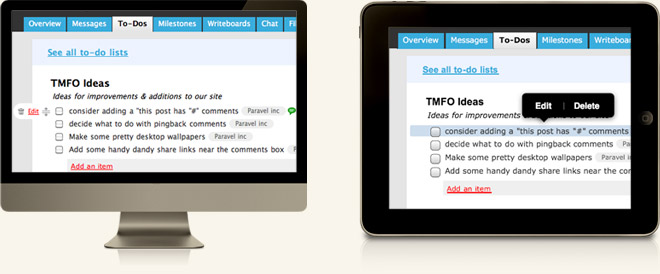
basecamp

Build specifically for touch-screen devices

and take advantage of native device controls, gestures and popovers. Touch-screen apps for Twitter and Gowalla play a key role in their overall success and are probably used more than the websites themselves. I use the Netflix iPad app regularly, but in many cases it feels like a hover-dependent website dropped into an iPad viewport. Currently, if you’re browsing instant titles and want to add something to your queue by tapping, you’re looking at a 3 step series of taps instead of an instant hover reveal option with a point-and-click interface. If you’re going to build specifically for touch, you’ve got to follow through.

netflix

Wait for touch hover technology.

I’m not convinced this would do anyone any good. It may be exciting to see what Cypress has come up with, and to know that Apple has applied for a patent for a proximity sensing touch-screen, but this does worry me. I’d hate to see us revert to our old shortcuts and make user experience sacrifices just because the technology is in place. Plus, we’re going to look like a bunch of idiots who are afraid to touch our smart phones & iPads. On the bright side, Phil Dunphy would love it!

We’re going to be OK.

Ultimately, I think seeing hover states fade away will make the web a better place. There never has been any substitute for concise content, clear interaction, and simple design. If we focus on core elements that make browsing the web great, our sites will function properly no matter how people use them.

48 Responses.

Leave a comment or contact me via Twitter @TrentWalton
  • Unique Design

    These are for sure great tips and advices for every web designers.

    Hover status are so cool and powerful that maybe sometimes even the best of us tends to abuse of them. Focusing on a strong UI that works well without hover it will provide the best user experience also to those user that uses touchscreen devices.

    Or the best maybe is to develop two side-by-side css that enhance UX for standard monitor users taking care of hover status, and a more simple yet effective version for touchscreens.

    Thanks for sharing Trent, as always your thoughts are some of the more insightful of the web.

  • Najeeb Puthiyallam

    Wow i was not aware about this issue.. thanks alot and yeah thank god i never practiced showing important information on hover action.

  • Simon Owen Design

    Nice, thanks for this. Some good points to consider especially as mobile browsing is on the up and up.

  • Simon Foster

    “There never has been any substitute for concise content, clear interaction, and simple design” = Win
    I like the idea of websites getting even more simple and fuss-free. I will no doubt be showing a few clients this post in the future, Cheers Trent.

  • Kev Charlton

    Great article, thanks Trent!

  • Ryan Rushing

    Wonderful points.

    I find it a little ironic that one of the same points Steve Jobs used in his ‘Thoughts on Flash’ article was “many Flash websites rely on ‘rollovers’,” but as you point out the issue isn’t unique to Flash and we need to be careful how we create from now on.

  • Los

    If anything, I think tapping or touching is a much more interactive gesture than a hover. To me that seems to have much more of a priority than a hover state. When you tap/touch you are physically interacting and a hover gesture is a “about to interact” gesture. I’m just saying that it’s a good argument to think about touch screen devices as you are saying. Makes sense to me. This would also prompt more JavaScript work as well, at least I think so?

  • Auré

    Really interesting point of view.

    “There never has been any substitute for concise content, clear interaction, and simple design” > yep, no doubt for that, and your website is a good illustration of this sentence.

    Thanks for this new post, it’s always a pleasure to read your articles.

  • Henry

    Well said Trent. I thought of this almost every day while browsing on the iPhone. Still I thought it would be an easy solution similar to what Cypress is doing.

    We will just to recreate a better UX by finding an alternative solution. Like the quote says: “Make everything as simple as possible, but not simpler”
     Albert Einstein

  • nigel

    I design for the web. But primarily I’m a user of the web, and as such I feel resentful at this new reality. We are not all Ipad users and the touchscreen devices of any sort are largely an industrialised western luxury. So this policy is equivalent to penalising anyone who doesn’t keep pace with these vanguard gadgets. What you suggesting is to treat any device that isn’t an apple handheld, touchscreen mobile or other tablet in the same vein as ie6.

    And of all things to ditch hover actions. It takes simplification and fat-trimming too far. In fact, hover action items are often an important way of simplifying the interface and are a well established convention for anyone using a mouse. I think the ipad and handhelds are actually showing up the shortcomings in design thinking – designing once for all devices when those devices are radically different simply isn’t practical and entails crippling compromises and backwards steps. What would make more sense here would be alternative redundant routes to actions hidden behind hover states, if necessary involving extra clicks. But definitely not to impair the internet for desktops and laptops, just because there’s an alternative way of viewing it.

  • Rasmus Kalms

    Nigel: No one is claiming that you should ditch hover states all together! I think, at least that’s what I took away from it, that Trent is trying to promote a new reality where you have to take touch-based users into account. No harm in that. But yeah: They are still, albeit growing, a minority.

  • Biyified

    Great Article, I have been thinking about this for a while too. Touch screen is the future and we all have to fit ourselves to its limitations.

  • Matt Sanders

    Trent, Very nice writeup. I think it is a sadness for the hover state to be in jeopardy. I currently do not enjoy interacting with events on a touch device in the same way I do my wacom or mouse. I do indeed hope that touch hover events come into play but you know. Technology does move forward. I think for the time being it is very important to consider this and take the necessary precautions in our work.

    Thanks for the contribution to the community.

  • chad engle

    “Ultimately, I think seeing hover states fade away will make the web a better place. There never has been any substitute for concise content, clear interaction, and simple design. If we focus on core elements that make browsing the web great, our sites will function properly no matter how people use them.”

    I think that says it all. I believe that mobile especially the iPhone & iPad because they are so good at what they do are pushing people to more streamlined, straightforward content. Which, makes me super happy.
    Thanks for the content Trent!

  • James

    In a lot of respects I agree with what you’re saying Trent but as Nigel pointed out, while the sales stats of iProducts are impressive they’re by no means significant in pointing to anything other than a marginal number of users compared to all net users on all platforms.

    I do agree totally that clear and concise content presented in a well thought out way is always going to be the best starting point but I think we’re beginning to branch out again in terms of viewing platforms and there’s the distinct possiblity that one solution won’t work for everything.

    Great article though, really gives pause for thought!

    J

  • Trent

    @nigel:

    So this policy is equivalent to penalising anyone who doesn’t keep pace with these vanguard gadgets.

    I’m not proposing we build websites that require multi-touch technology. That would create the same problem on the opposite end.

    hover action items are often an important way of simplifying the interface

    I agree with you and think that the Amazon category navigation and WordPress admin screen action items cited in the article are good examples of solutions that work for everyone. Thank you for your thoughts.

  • Trent

    @James: Excellent point about multi-touch device sales vs point and clickers. Most of the time I’m at a laptop myself, but I do believe that these trends will continue. 376 Million touch-screen phones being sold in 2009 is nothing to balk at :)

    there’s the distinct possiblity that one solution won’t work for everything

    I agree wholeheartedly. Sites with many layers of functionality very well may need to build multiple versions to retain that functionality. Moving forward, I think it will be really exciting to see what we all come up with.

  • Marty

    Great discussion starter. Designing will always be about working to offer up “concise content, clear interaction, and simple design”. However, subordinating UI options of lesser importance is part of what hover states enable. So while there’s no arguing with your points about what’s important in design, removing a useful tool for simplifying interfaces because the current technology doesn’t support it feels a little like “rules” created in the early days about optimizing for a web palette or for the modem. It may be appropriate for a particular point in tech/time, but shouldn’t be seen as a reason to hobble perfectly viable and useful tools in an environment where they work (pc browsers) in order to suit a nascent stage technology. I don’t think you really prescribe that, but the title sure feels like that’s the hook. Hooked me.

    If hover-like human/machine interaction is useful, the technology will catch up. In the meantime, thanks for raising the issue for folks having to design for these devices today.

  • Edgar Leijs

    Touch experiences and smaller screens give designers and developers the chance to think again about essentials. We are used to stuffing everything on the same page or stuffing everything behind content. Often non essential content!
    Now we get the opportunity to shift the crap out now…

  • Joe Lanman

    Great article on a subject I’ve been mulling over a lot recently.

    The hover pattern can really enhance a cursor-based experience, hiding low-priority interface elements until mouse-over – which will definitely happen since you are moving a cursor, therefore the elements are highly discoverable.

    Obviously the pattern is unusable for touch-screens, therefore does it make sense to have some sort of hook for us to detect the type of interaction? CSS media queries (http://www.alistapart.com/articles/responsive-web-design/) allow us to adapt to how the site is being displayed (screen size etc), maybe we need something similar to detect input methods?

  • Justin

    The sales figures are definitely pointing towards the need to do something now.

    376 Million touch-screen phones being sold in 2009 is nothing to balk at :)

    Having said that though what are the actual usage statistics? I had a quick whip around the interweb in search of such data but have come back fairly empty handed in terms of real statistics, but quite a few ways to detect such devices.

    I agree that we should be designing interfaces that are accessible across all mediums, but we need to be able to cater for each of these with some relative ease.

    Here, http://www.zytrax.com/tech/web/mobile_ids.html, is a list of user strings for most of the current mobile phones, and over here http://www.hand-interactive.com/resources/detect-mobile-php.htm we have a break down of iphone/windows/symbian/blackberry etc etc.

    http://wurfl.sourceforge.net/ offers an XML file of available mobile devices and a very detailed review of their capabilities.

    MobileESP is available from the code base on google, http://code.google.com/p/mobileesp/, which appears to be quite helpful, but also goes on to say it’s not a replacement for WURFL or Hand Interactive.

    Hand Interactive uses PHP to identify what device you have such as the iPhone/iPod Touch, Symbian S60 or BlackBerry – http://www.hand-interactive.com/resources/detect-mobile-php.htm

    Does anyone use other ways to touch/smart phone detection? Is it possible to identify if a device offers touch capabilities as part of the user agent string rather than comparing it to another list?

  • Trent

    @Joe Lanman: Moving forward, I think many sites will need to detect touch-screens to provide the multiple layers of functionality they currently offer. I’d be interested to know what people think the best methods would be… In addition to CSS media queries, I’ve seen PHP and JavaScript solutions. Justin has a few more resources to add to the mix as well.

    @Justin: I’d love to get more data on touch-screen usage. If anyone has some solid numbers, please do share.

  • Patrick

    Excellent article. I have been thinking (worrying) for a while about how to adapt design for touch devices, and what your article has finally convinced me is that the whole interaction and display paradigm needs to be rethought for these devices. It’s tempting to think that tweaking a few stylesheets and having fall-backs is enough, but we are reaching a point where that’s no longer practical. I think I’ve got a lot of learning to do…

  • Trent

    @Patrick: I think we all have a lot of learning to do!

  • Paul

    Nice article, there has been some good thinking around the web on the implications of touchscreen usage recently.

    I wonder whether it is technically possible and if touchscreen users would adapt to supplementary (this is key!) information being shown on the active link state as opposed to hover. Imagine this scenario – a user clicks and holds a menu link on their iPhone then moves down (while still holding) to a suboption on a drop down submenu that is only visible on :active.

    Perhaps that could work…something to play with in the near future :) Otherwise, simple buttons that require only one click to then display additional fields/info/links would seem to be a simple, concise and useable option.

    - P

  • Joe Lanman

    @Trent That looks like an interesting JavaScript solution, however the Chrome example is interesting – he had to change the property he was testing against since it started appearing in Chrome desktop. Theoretically someone might start using their finger on a mouse-driven PC that also has touchscreen, or plug a mouse into their (future) iPad.. Tricky.

  • Sachin

    these tips are marvelous and thought provoking….thanks for sharing

  • Benxamin

    The hover state has always been a “You are here” identifier for the mouse. It’s more of a nice way of asking “are you sure you mean to click THIS one?”

    Without a mouse, we don’t need a “you are here.” The end of our finger IS where we’re “at.”

    I do like the idea of a “hotspot” that appears on tap-down-and-hold. Then, you could simulate hover effects by proximity to the hotspot.
    Some iTouch games already have this for moving/placing characters on a field.
    Which begs the question, why *isn’t* there a hotspot (a glow of some kind) to provide a visual indicator where you touch the screen at?

  • Cliff Tyllick

    Trent, very well stated. I’m actually glad to see iPads forcing us to rethink the use of on hover actions in our interfaces. And my reasoning has nothing to do with my own personal comfort and convenience. I actually enjoy the on hover experience — when I see a new feature reveal itself unexpectedly, it’s almost as if I just discovered an Easter egg. And I do use the mouse a lot, even when I know a key sequence is actually faster. What can I say — I’m just a point and click kind of guy.

    But not everyone has the luxury of being me. Some people can’t see the change on hover. If the interaction isn’t carefully thought out, which usually means building in redundant links off screen, their screen reader won’t perceive anything, either. Other people can see that something changes, but can’t tell what that change was. These would be people with low moderate vision — far better than mine when I’m not wearing my glasses, but, unlike mine, not possible to correct to anything even approaching 20/20. For people with mobility impairment, on hover is often a challenge: Do they get an equivalent experience as they tab through the content? And when relied on for too subtle a connection, on hover is a beast for some people who have cognitive disabilities: They might not perceive that anything new could pop up as they move the mouse or press the tab key. Others, with different forms of cognitive disability, might become distracted and lose track of their goal when on hover behavior changes the appearance of the interface.

    In short, on hover might be an Easter egg hunt for me, but it’s a minefield for people who have disabilities. And to those people who resist making Web content accessible to people with disabilities because they mistakenly believe that “people with disabilities” is a very small, very needy, and incredibly insignificant group, having to consider whether their design works for a huge audience of people who have touchscreen devices and a significant wad of disposable income just might lead them to rethink their position.

    If so, the result should be interfaces that are more accessible to everyone.

    And that would be a very good thing.

  • Patrick H. Lauke

    Interestingly, reliance on hover states and mouseover/mouseout has been a huge accessibility problem for keyboard users for years. Partial approaches that worked are doubling up CSS selectors and JS events with their equivalent :focus and onfocus/onblur events (which also obviously highlights another keyboard-user’s problem…that often developers simply rely on non-focusable elements – for instance a div with an onmouseover/onclick handler, rather than a real button or input element). This still leaves the problem of controls that are supposed to be both clickable and focusable/hoverable (as then on a touch device, where focus is set by clicking/activating, would again just execute the click), but it’s a start. Rather sad to see that, despite years of trying to educate developers and designers not to rely on mouse-centric interactions and to consider keyboard users, it’s only now that these designers get their shiny new iDevices and such that they all of a sudden notice the problem…

  • Trent

    @Cliff Tyllick & @Patrick H. Lauke: Great points… Hopefully, we’ll be able to use the hubbub around these shiny iDevices to push solid, accessible design.

  • davatron5000

    @Justin:
    I’ve got a few usage statistics for you:

    78% of smartphone users accessed their browser in April 2010, while 80% of smartphone users accessed applications
    6.2% of smartphone users accessed social networking sites via mobile applications, 12.8% of smartphone users accessed social networking sites via mobile Web browser.
    Fun fact: Users of eBay’s app on Apple’s iPad spend three or four times as much money in a typical session than they would on an iPhone.
    Luke Wroblewski’s Data Monday: Mobile Apps vs. Mobile Web

    In regards to detecting touch, I think using the javascript solution is a way better practice than user agent sniffing. But like that article said, it appears that Google Chrome (desktop) has Touch Events enabled… giving a false positive. shreesh. But I suppose they’re moving towards a table interface or expecting touchbased hardware (like the magic mouse) to be readily available.

    Also, @the guy who called touchscreen devices a “western luxury”: Sure, this year they are a western luxury. But look for these to spread to Africa and through Asia because of their portability, long battery life, and lack of need for a permanent power supply. Compared to the OLPC, this is a much better system, and a supported operating system.

  • Joe

    Apple has applied for a patent for a proximity sensing touch-screen

    I wouldn’t be terribly surprised if the very reason Apple applied for this patent was to prevent the technology from ever getting into the wild. This idea of actually hovering over a touchscreen with a finger while holding the device in the other hand would be quite difficult for me (and I suspect many others my age who may have lost a bit of our youthful manual dexterity).

    It seems to me (disclaimer: I obviously do not in any way personally know Steve Jobs) that this would be the sort of thing Mr. Jobs would find very distasteful and therefore consider it his personal mission to prevent becoming a common interface gesture.

  • Joel

    I’ve been thinking about this for a while, so thanks for the post, Trent. I’m on the side that believes limiting the display of details to tooltip-type hover actions is good information design.

    As Paul suggests, I too wonder if there could be a touch-and-hold gesture for touch screens to replace hover gestures on non-touch. A kind of “drill-down” or “lingering” metaphor implying “I want to know more about this.”

  • Paul

    As a follow up to my previous comment, I’ve tested using li:active to display a sub navigation, which is one case where :hover is often used on systems that support it.

    While it works on desktop (with the unfortunate, yet standard, behaviour of selecting all the text node content as you move down onto sub items), it doesn’t work on the iPhone. The reason being that, of course, holding links in Safari Mobile brings up the iPhone’s inherent options for opening in a new window and such.

    So, I guess I’d revert back to my second original point where the use of a well labelled button reveals secondary/collateral features through click, should you not wish to show everything by default, as per the WP admin screen.

    Another thought that occurs is whether in future we will see multitouch gestures (as used on laptop trackpads) providing the added functionality that touch devices (IMO) desperately need.

    - P

  • yitznewton

    “proximity sensing touch-screen”

    Wow, that sounds like an awful idea to me. I’m having an ergo-challenge getting used to browsing on my first smartphone, with a slightly tight holding arm; I can’t imaging doing much hover-touch browsing without my pointer arm falling off.

  • Octavio Corral

    Great article Trent! You’re very right. Regardless of the device, thinking about the UI for all devices (touch and non-touch) will be better in the end. To make things more confusing, Windows 7 & Vista have supported touch-screens for awhile now as well. HP is always making those hybrid desktop touch screens. Even Dell is making these weird hybrid laptop touch screens like the “Studio 17 Touch”. While I don’t think they’ll catch on, they are still out there and being sold.

    Who knows what we’ll be interacting with 5 years from now. The less moving parts we have now, they greater chance they’ll work across all devices later.

  • Sacha

    If you think about it, most user interfaces have never used hover at all: video game consoles, TVs, car GPS systems… So I don’t think it will be too hard to progressively move away from it for websites.

  • Rose

    Very well put together and interesting and SO true, as sad as I am to admit it.

    Pretty hover states are an aspect of web design that I really enjoy, so it makes me sad to know that it’s something that won’t be around forever…

    One thing that I’m not sure about, and I don’t know if you were even suggesting this, is whether touch screens will ever be the conquer-all. I think many people prefer a keyboard and a mouse and a monitor at a DESK and not in some small rectangle in their backpack.

    (another thought: All this technology makes the need for a man-purse that much greater.)

  • Paul

    @Sacha: I’d have to disagree there Sacha; if you use your remote to navigate your television’s menu or your handheld controller to navigate your console game, you will likely see hover effects. For example, check out the Wii – the user has a (fairly large) cursor but the hover state lets the user know that their cursor is over a button.

    If you have an intermediary peripheral for pointing (e.g. a mouse or Wii controller) then hover is incredibly useful, it is effectively the equivalent to indicating focus when using keyboard navigation. I’m not keen on losing it!

  • Sacha

    @Paul good point, I guess you’re right. But it’s still true that there are a lot of different interfaces out there with their own interaction modes, and non-web/application designers have been using them for a long time. So the non-hover world might seem scary to us, but it’s far from uncharted territory :)

  • James Conaghan

    I remember a time when people said ‘stay away from javascript because most users don’t have it enabled… now it’s common place, even on Google’s home page. I would have thought therefore, it’s for the mobile or touch screen technology to catch up with the existing standards (or practices) whereas the suggestion in most of the comments above seems to be, that we, as website designers, have to adapt to whatever people like Steve Jobs decides to bring out next.

    Sorry to disagree with most of you, but isn’t this a bit like Microsoft’s attitude in ye old days where they resisted the adoption of a standard for web browsers? Hence you had websites reading as you designed them in Internet Explorer but not in Netscape or Opera or Safari or whatever. Surely devices that come on to the market now, should do the world a favour and allow for existing trends, instead of trying to coerce the world into adapting their existing set-ups to another new way of doing things?

    If there was a benefit that outweighed what websites do for people and businesses now, I’d be the first to applaud, but I can’t see it. I just see more expense for everyone, people AND business, who will need to adapt their current websites to mobile and touch screen technology (assuming they want to market their products or services to mobile users). Sure, you can’t halt progress, but that presupposes that all progress is a good thing when most progress is actually like catwalk fashion; here today and changed next season.

  • Art Thompson

    Hover (mouseOver, etc.) is both a blessing and a curse. Interaction designers (myself included) rely on this device not only for user feedback, but also for wrangling in those odd stacks of information that don’t seem to fit anywhere in our layouts but in a tooltip or slide-in/out panel. Just look at how many jQuery plug-ins serve this very function. I agree that, while tap/touch present a whole new slew of metaphors and possibilities we aren’t all soon going to abandon our mice in favor of what are still rather un-ergonomic touchscreen devices just because Steve Jobs tells us to. And, frankly, if Apple released a 64 GB speckled trout with an HD touch screen in it’s belly tomorrow there’d be a line out the door.

  • Brian

    Trent, your work and articles/knowledge of design is so inspiring. I hope one day I can be at your level. Keep up the great work!

  • Trent

    @Art Thompson:

    if Apple released a 64 GB speckled trout with an HD touch screen in it’s belly tomorrow there’d be a line out the door.

    I just bought a flying Delorean and went 30 years into the future so I could pre-order mine ;) I wonder if anyone owns / has tested any PC based touch screen items… I’ve yet to experiment with those.

  • Feroze

    Hello,

    I think hover technology will be very useful for touch screen interfaces. Of course hover states can be abused but this is not a good reason to withhold this technology as an addition to current user interface controls. Hover technology on the iPad, iPhone will open doors and offer additional methods to access information and content from a website. I expect hover technology in future Apple multi-touch devices as well as from other competing companies, and I also expect innovative website designs to follow.

  • Jason

    This article was a real eye-opener. It doesn’t make me nervous for the future though, it makes me crave to learn how to do new things for new technologies. As far as the proximity sensing touch goes I think that may work out fine for most people. I have a Wacom tablet that uses similar technology but that uses a Pen and I find it easier to use than a mouse in many cases.

  • Sean McCann

    I don’t think current touchscreens will stop web designers from adding :hover elements; one as they provide a useful way to show data that would look out of place on a webpages design and two because as stated in your article, a patent has been granted for Apple to use a proximity sensor within their devices; which I have no-doubt of a similar concept being applied to most other touchscreen devices in the future.

Leave a Reply